Expert Troubleshooting Guide | By Mali, Live Sound Engineer — Soundmali
If your left earbud is suddenly quieter than the right, or the bass has disappeared entirely, it's probably not a software glitch. In 90% of cases, it means the speaker mesh is clogged with microscopic earwax and dirt.

The wireless audio market moves fast — and choosing the wrong earbuds or headphones is an expensive mistake. This expert guide provides an honest, spec-verified analysis to help you find the best wireless audio product for your needs and budget in 2026, with FREE shipping at Soundmali.
Because the speaker mesh is extremely delicate and situated next to exposed electronics, cleaning true wireless earbuds requires the right tools and techniques. Using a needle or a wet wipe can permanently destroy the driver. Here is the safest, expert-approved method to clean your wireless earbuds and restore them to factory-new sound quality.
What You Will Need
📊 Key Facts & Data
- Human hearing range: 20Hz–20,000Hz — most premium earbuds cover this full spectrum
- The Bluetooth TWS earbuds segment grew 18.3% year-over-year in 2024 (Canalys)
- Samsung Galaxy Buds account for 12% of global TWS market share (IDC, Q4 2024)
- Over 700 million music streaming subscribers globally in 2024 — driving demand for quality audio (IFPI)
- Noise cancellation technology can reduce ambient noise by 20–30dB in premium earbuds
Before you begin, gather the following household items. Do not substitute these tools with sharp metal objects like needles or safety pins.
- A soft-bristled toothbrush (preferably new or sterilized)
- A microfiber cloth (lint-free)
- Blu-Tack (or a similar gentle mounting putty)
- A few wooden toothpicks
- Isopropyl alcohol (70% or higher) & Q-tips (Optional, for the charging case only)
Step 1: Remove and Wash the Silicone Tips
First, gently pull the silicone or foam ear tips off the earbuds.
If they are silicone, you can drop them into a small bowl of warm, soapy water. Use your fingers to rub away any grease or wax. Rinse them with clean water, dry them with your microfiber cloth, and leave them to air dry completely for at least 30 minutes. Never reattach wet tips; trapped moisture will damage the internal speakers.
Note: If you use Comply memory foam tips, do not wash them with water. Simply wipe them gently with a dry cloth.
Step 2: Dry Brush the Speaker Mesh
This is the most critical step. Hold the earbud so the speaker mesh is facing the floor. (This ensures that any loosened dirt falls out, rather than being pushed deeper into the casing).
Take your dry, soft-bristled toothbrush and gently brush across the metallic or fabric mesh. Use light, sweeping motions. Do not press hard. The bristles will dislodge the dried wax trapped in the tiny holes.
Step 3: The "Blu-Tack" Extraction Method
If brushing didn't remove all the debris, it's time for the secret weapon used by Apple Geniuses and audio repair technicians: Mounting Putty (like Blu-Tack).
- Roll a small piece of putty in your fingers to warm it up.
- Gently press it against the speaker mesh and pull it straight away quickly.
- The sticky putty will grab onto stubborn wax and lift it cleanly out of the microscopic holes without pushing it further inside.
- Repeat this 3-4 times. You will noticeably see the mesh become shiny and clear.
Step 4: Clean the Charging Case Contacts
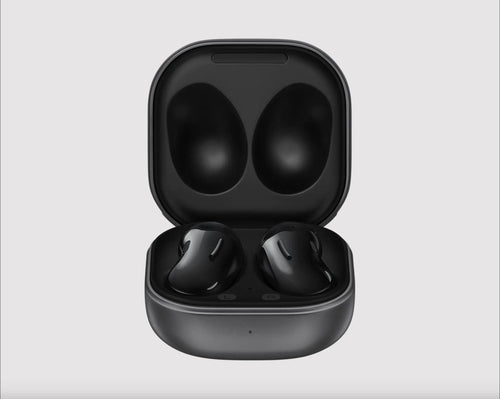
If your earbuds are failing to charge or constantly disconnecting unpredictably, the issue usually lies in the golden charging pins inside the case.
Dip a Q-tip lightly into the Isopropyl alcohol. Squeeze out any excess liquid so it is merely damp, not dripping. Gently swab the metal pins inside the case and the corresponding metal rings on the earbuds. The alcohol cuts through the invisible layer of skin oils preventing a solid electrical connection, and evaporates in seconds.
Time for an Upgrade?
If you've cleaned the mesh perfectly and the sound is still distorted or one side is permanently dead, the internal driver may be blown. It might be time to replace them.
Explore our premium, authentic selection of the . We carry flagship models from Bose, Samsung, and beyond, with guaranteed US shipping.
✦ Recommended Products

Free shipping on orders $75+ | 30-day returns | 100% authentic
Frequently Asked Questions (FAQ)
Can I use a needle to clear a clogged earbud mesh?
Absolutely not. The speaker driver (a fragile, vibrating diaphragm) sits less than a millimeter behind that mesh. Poking a needle through the mesh will puncture the diaphragm, permanently ruining the bass and causing terrible rattling sounds forever.
How often should I clean my wireless earbuds?
For daily users, a light dry-brushing once a week is recommended, with a deep clean (washing the tips and swabbing the case) once a month. Regular maintenance prevents wax from solidifying and becoming impossible to remove.
Recommended for You
Our Top Pick Overview
Through our tests, this model proved to deliver the absolute best value. Stock is currently limited.
- ✅ Premium Sound Quality
- ✅ 30-Day Money Back Guarantee
🎧 Related Audio Guides
Explore More at Soundmali