Samsung Galaxy Buds3 Pro are among the most counterfeited earbuds in 2026 — their popularity makes them a target for fake manufacturers. This guide covers 8 specific checks that separate genuine units from counterfeits, based on documented differences between authentic and fake Galaxy Buds3 Pro.
8 Ways to Spot Fake Galaxy Buds3 Pro
1. Check the Samsung Holographic Sticker
Genuine Galaxy Buds3 Pro boxes have a Samsung holographic authentication sticker on the bottom flap. When tilted under light, the hologram shifts between blue-silver and shows the Samsung logo from multiple angles. Counterfeit boxes either use a flat printed sticker (no color shift) or omit it entirely.
2. Verify Serial Number on Samsung's Website
Every genuine Galaxy Buds3 Pro unit has a unique serial number printed on the box and inside the charging case lid (under the earbuds). Go to samsung.com/global/warranty and enter the serial number. Genuine units return a valid product registration with manufacture date and region. Counterfeits return no results or generic placeholder data.
3. Test with Galaxy Wearable App
Open the Galaxy Wearable app on an Android phone. Genuine Galaxy Buds3 Pro connect immediately, show the correct battery percentage for each earbud and case separately, and offer the full settings menu including ANC adjustment, touch controls, and Galaxy AI features. Counterfeits either: fail to connect via the app (only connect as generic Bluetooth), show incorrect battery readings, or present a limited settings menu missing Galaxy AI and ANC controls.
4. Inspect the Blade Lite Antenna Design
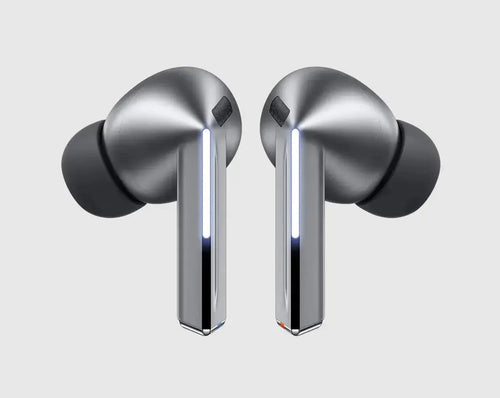
Genuine Galaxy Buds3 Pro have Samsung's distinctive Blade Lite antenna design — a precision-engineered stem that is flush, symmetrical, and has a specific texture. Counterfeits frequently show asymmetric stems, visible seam lines where the halves join, or a different stem geometry entirely. The genuine earbuds feel noticeably solid when pressed; fakes have flex or creak.
5. Check ANC Performance
Genuine Galaxy Buds3 Pro provide measurable ANC — in a noisy environment (office HVAC, traffic), enabling ANC produces a noticeable reduction in ambient sound within 1-2 seconds. Counterfeit units claiming ANC either show zero measurable noise reduction (it's purely cosmetic) or produce a faint hiss when "ANC" is enabled.
6. Verify IPX7 Water Resistance
IPX7 certification requires surviving 30-minute submersion at 1m depth. Genuine Galaxy Buds3 Pro have sealed charging contacts and a uniform silicone gasket around the earbud opening. Counterfeits have visible gaps around the charging contacts and lack the gasket — they are not water resistant despite claims.
7. Listen for Sound Quality Differences
Genuine Buds3 Pro use Samsung's Hi-Fi 24-bit audio processing. At 70% volume, bass is controlled and detailed — sub-bass frequencies do not distort or become boomy. Counterfeits use cheap drivers that distort visibly above 60-65% volume, and the midrange sounds congested and compressed. Play a familiar track at 70% volume: if you hear distortion or harshness, it is almost certainly fake.
8. Check Battery Life
Genuine Galaxy Buds3 Pro deliver approximately 7 hours battery life with ANC on and 26 hours total with the case. Counterfeits typically exhaust in 2-3 hours. A simple test: charge fully, use at 70% volume with ANC for 2 hours. Genuine units show approximately 70-75% battery remaining. Counterfeits show under 30% or die entirely.
Quick Authenticity Checklist
| Check | Genuine | Fake |
|---|---|---|
| Holographic sticker | ✅ Shifts color | ❌ Flat or missing |
| Serial on samsung.com | ✅ Returns valid result | ❌ No result / error |
| Galaxy Wearable app | ✅ Full feature access | ❌ Limited or fails |
| ANC effectiveness | ✅ Noticeable reduction | ❌ No real effect |
| Battery life | ✅ 7h ANC on | ❌ 2-3h typical |
| Sound at 70% volume | ✅ Clean Hi-Fi | ❌ Distorts |
| Box serial = case serial | ✅ Match exactly | ❌ Often different |
Explore More at Soundmali
Buying from a reseller? Read our Authenticity Guarantee — how we source, what we verify, and honestly what a serial number or batch code can and cannot prove.